
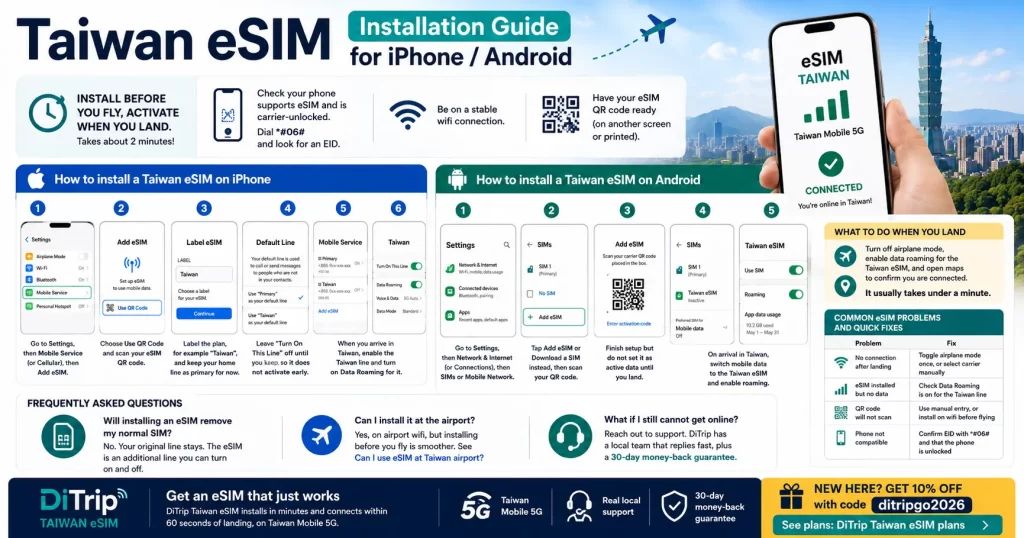
Installing a Taiwan eSIM takes about two minutes, and the golden rule is simple: install before you fly, activate when you land. This guide walks through the exact steps for both iPhone and Android, plus how to fix the most common issues.
Before you start
- Check your phone supports eSIM and is carrier-unlocked (dial *#06# and look for an EID).
- Be on a stable wifi connection.
- Have your eSIM QR code ready (on another screen, or printed).
How to install a Taiwan eSIM on iPhone
- Go to Settings, then Mobile Service (or Cellular), then Add eSIM.
- Choose Use QR Code and scan your eSIM QR code.
- Label the plan, for example “Taiwan”, and keep your home line as primary for now.
- Leave “Turn On This Line” off until you land, so it does not activate early.
- When you arrive in Taiwan, enable the Taiwan line and turn on Data Roaming for it.
How to install a Taiwan eSIM on Android
Steps vary slightly by brand, but the flow is the same:
- Go to Settings, then Network and Internet (or Connections), then SIMs or Mobile Network.
- Tap Add eSIM or Download a SIM instead, then scan your QR code.
- Finish setup but do not set it as active data until you land.
- On arrival in Taiwan, switch mobile data to the Taiwan eSIM and enable roaming.
What to do when you land
Turn off airplane mode, enable data roaming for the Taiwan eSIM, and open maps to confirm you are connected. It usually takes under a minute.
Common eSIM problems and quick fixes
| Problem | Fix |
|---|---|
| No connection after landing | Toggle airplane mode once, or select carrier manually |
| eSIM installed but no data | Check Data Roaming is on for the Taiwan line |
| QR code will not scan | Use manual entry, or install on wifi before flying |
| Phone not compatible | Confirm EID with *#06# and that the phone is unlocked |
Frequently asked questions
Will installing an eSIM remove my normal SIM?
No. Your original line stays. The eSIM is an additional line you can turn on and off.
Can I install it at the airport?
Yes, on airport wifi, but installing before you fly is smoother. See Can I use eSIM at Taiwan airport?
What if I still cannot get online?
Reach out to support. DiTrip has a local team that replies fast, plus a 30-day money-back guarantee.
Get an eSIM that just works
DiTrip Taiwan eSIM installs in minutes and connects within 60 seconds of landing, on Taiwan Mobile 5G. New here? Start with our Taiwan eSIM guide, or grab a plan with 10% off using code ditripgo2026: DiTrip Taiwan eSIM plans.